Go Back   EQEmulator Home > EQEmulator Forums > Support > Support::General Support

Support::General Support Post all topics here having to do with errors while trying to connect to an EQEMu server but not about the setup/running of the Server itself.

Reply
 
Thread Tools Display Modes
  #1  
Old 06-07-2008, 10:44 AM
avatarofdiscord
Fire Beetle
 
Join Date: Jun 2008
Location: Louisiana
Posts: 2
Default

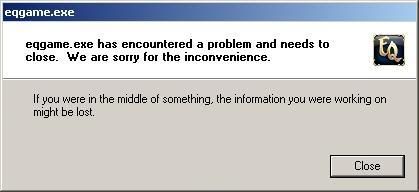
I actually have the same problem of the client immediately crashing, but this pops up:


The thing is, I logged on last night and leveled about 5 levels, went linkdead, and the game froze. I have to close the game using ctrl+alt+del, and i tried to open the client again and it keeps crashing.
Reply With Quote
  #2  
Old 06-07-2008, 12:58 PM
GeorgeS
Forum Guide
 
Join Date: Sep 2003
Location: California
Posts: 1,474
Default

On my vista32 machine, I reduced the desktop resolution to 1024x768 and made sure the eqgame runs in window mode. That fixed the error.

My laptop runs Nvidia 8800gts and 4 gigs memory, and at first eqgame crashed. Try the above.

GeorgeS
__________________
Your source for EQ database tools
Toolshop is open for business


http://www.georgestools.chrsschb.com//
Reply With Quote
  #3  
Old 06-07-2008, 04:02 PM
Detest
Fire Beetle
 
Join Date: Jun 2003
Posts: 6
Default

So how do I force the game to run in windowed mode? Is there some line i need to add to the eqclient.ini?
Reply With Quote
  #4  
Old 06-07-2008, 04:05 PM
Detest
Fire Beetle
 
Join Date: Jun 2003
Posts: 6
Default

Quote:
Originally Posted by avatarofdiscord View Post
And I do get that same error window, but like I said in my first post there is almost no useful information in the window. It doesn't have one of those for more information click this buttons.
Reply With Quote
  #5  
Old 06-18-2008, 05:32 AM
Aramid
Discordant
 
Join Date: May 2006
Posts: 356
Default

Quote:
Originally Posted by Detest View Post
And I do get that same error window, but like I said in my first post there is almost no useful information in the window. It doesn't have one of those for more information click this buttons.
I know you solved your problem, but actually, you DID get useful info, so I am posting this for others to reference. In your log that you posted above you got:

2008-06-07 02:24:56 Resolution was capped at 1280 x 720
2008-06-07 02:24:56 Resolution verified 1280 x 720, 32 bits ... diff was 1000 from 0 modes
2008-06-07 02:24:56 Resolution selected 1280 x 720, 32 bits
2008-06-07 02:24:56 CRender::InitDevice: Using 32bit mode.
2008-06-07 02:24:56 CRender::InitDevice: Using vsync 0.
2008-06-07 02:24:56 CRender::InitDevice: Using 24bit depth buffer with 8 bit stencil.
2008-06-07 02:24:56 CRender::InitDevice: HardwareTnL Enabled.
2008-06-07 02:24:56 Using hardware vertex shaders.
2008-06-07 02:24:56 CRender::InitDevice: Retrying without lockable backbuffer.
2008-06-07 02:24:56 CRender::InitDevice: Using Software Vertex processing.
2008-06-07 02:24:56 CRender::InitDevice: CreateDevice failed.


Right here it's telling you it's a video problem.

Run the OPTIONS program or go directly into eqclient.ini and set the resolution low, like 800 X 600 and work you way up from there.
__________________
Random Segments of Code....
Reply With Quote
Reply

Thread Tools
Display Modes

Posting Rules
You may not post new threads
You may not post replies
You may not post attachments
You may not edit your posts

BB code is On
Smilies are On
[IMG] code is On
HTML code is Off

Forum Jump


All times are GMT -4. The time now is 08:25 PM.


Everquest is a registered trademark of Daybreak Game Company LLC.
EQEmulator is not associated or affiliated in any way with Daybreak Game Company LLC.
Except where otherwise noted, this site is licensed under a Creative Commons License.
       
Powered by vBulletin®, Copyright ©2000 - 2026, Jelsoft Enterprises Ltd.
Template by Bluepearl Design and vBulletin Templates - Ver3.3