|
|
|
 |
|
|
 |
|
 |
 |
|
 |
 |
|
 |
|
| Support::Windows Servers Support forum for Windows EQEMu users. |

08-16-2015, 08:02 PM
|
|
Sarnak
|
|
Join Date: May 2011
Posts: 56
|
|
 Admin Password?
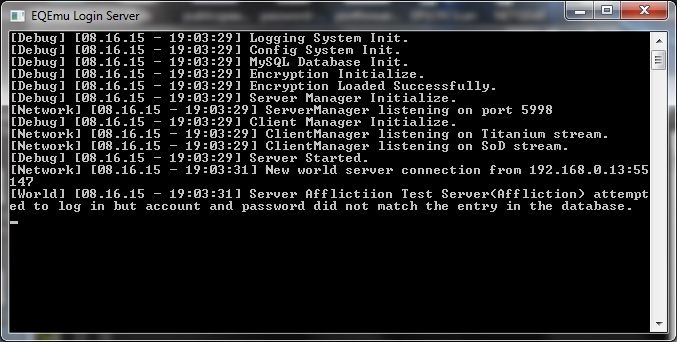
Using http://wiki.eqemulator.org/p?Complet...Guide&frm=Main to create a private server for the wife and I to play on: http://wiki.eqemulator.org/p?Windows...Guide&frm=Main
I have followed these guides step by step, even trashed it all and started over and I always end up here.
Creating my own server and I've tried about 8000 possible combinations and still have no clue what the admin name or password is. Any ideas? And yes, I have tried every single PW I set, but it appears I didn't set this password or I would know it. What database? It accepts none of my logins or passwords, tried admin/Admin password/Password....nothing works. Hell I've even left it blank, still no luck. |
08-16-2015, 08:54 PM
|
 |
Developer
|
|
Join Date: Apr 2012
Location: North Carolina
Posts: 2,815
|
|
(Assuming that you have your own login server running...)
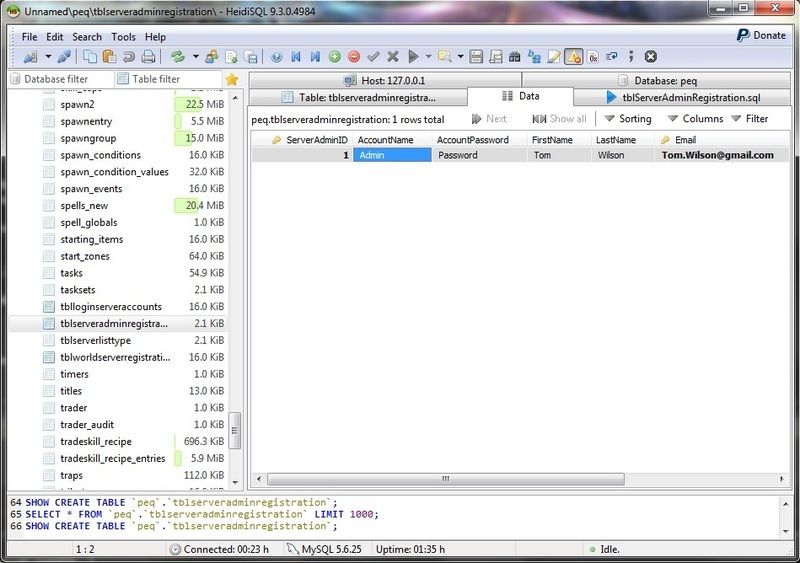
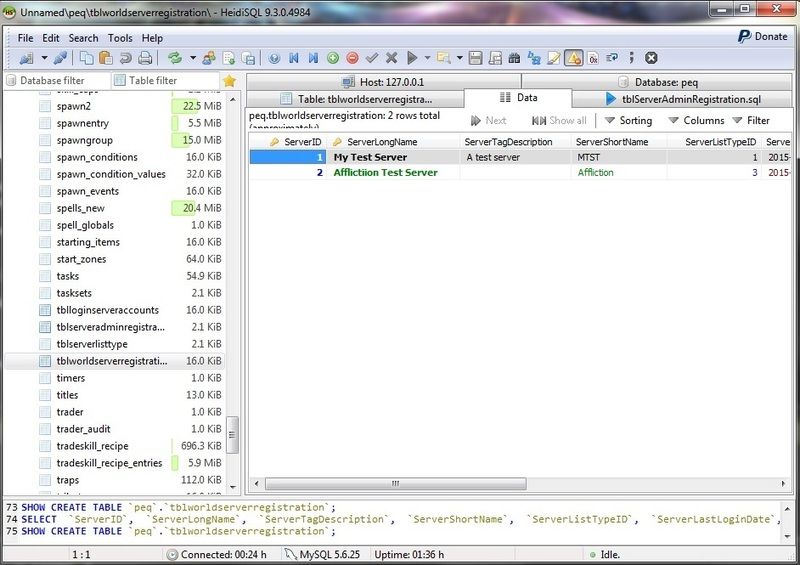
For world accounts, you need to ensure that the id's match in `tblserveradminregistration` and `tblworldserverregistration` .. as well as
the <account> and <password> fields in your eqemu_config.xml file to the corresponding columns in `tblserveradminregistration.`
You might try setting login.ini:unregistered_allowed to TRUE just so you can get in and verify that everything else is working.
(If you're using the eqemu public login server...)
You should be allowed to connect without a valid account/password.
__________________
Uleat of Bertoxxulous
Compilin' Dirty
|
08-16-2015, 09:22 PM
|
|
Sarnak
|
|
Join Date: May 2011
Posts: 56
|
|
Quote:
Originally Posted by Uleat

(Assuming that you have your own login server running...)
For world accounts, you need to ensure that the id's match in `tblserveradminregistration` and `tblworldserverregistration` .. as well as
the <account> and <password> fields in your eqemu_config.xml file to the corresponding columns in `tblserveradminregistration.`
|
This is where things get confusing. Could you explain this in detail? ( I have no idea who Tom Wilson is)
 |
08-16-2015, 09:45 PM
|
|
Developer
|
|
Join Date: Apr 2012
Location: North Carolina
Posts: 2,815
|
|
These two id's should be the same:


EDIT: And the account/password from your first image link should be what appears in your eqemu_config.xml file for world login.
__________________
Uleat of Bertoxxulous
Compilin' Dirty
Last edited by Uleat; 08-16-2015 at 09:51 PM..
|
08-16-2015, 10:03 PM
|
|
Developer
|
|
Join Date: Apr 2012
Location: North Carolina
Posts: 2,815
|
|
Looking at your server admin registration table, you just have the default entry from the db creation.
You can use that entry, or create a new one..either way will work - so long as the ServerAdminID's match and your config file
is up-to-date.
__________________
Uleat of Bertoxxulous
Compilin' Dirty
|
08-17-2015, 08:45 AM
|
|
Sarnak
|
|
Join Date: May 2011
Posts: 56
|
|
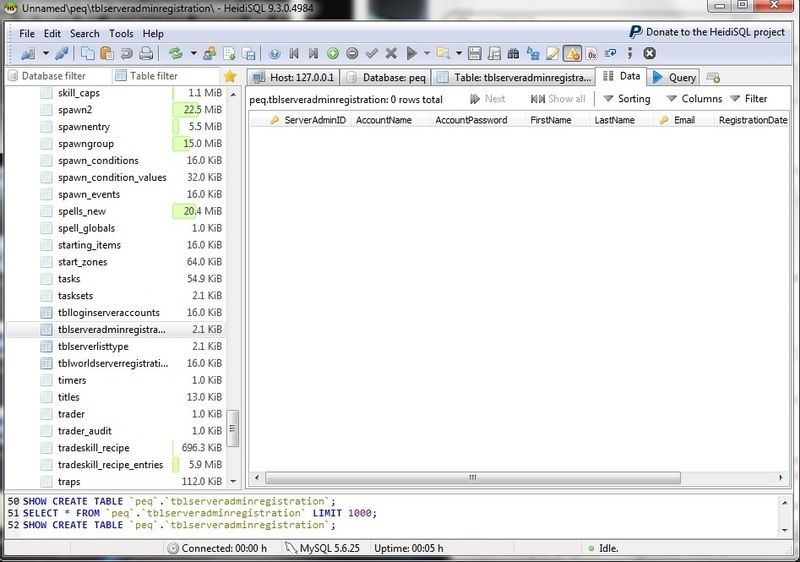
My admin box is empty. I'll have to correct that and see if that fixes the issue.
|
 |
|
 |
08-17-2015, 11:41 AM
|
|
Sarnak
|
|
Join Date: May 2011
Posts: 56
|
|
I tried Admin/Password but it didn't work. None of the accounts are showing in the world server reg box.
I've been researching this today and am not sure how to 'register' the server so it shows up admin:
Quote:
[Debug] [08.17.15 - 15:18:50] Logging System Init.
[Debug] [08.17.15 - 15:18:50] Config System Init.
[Debug] [08.17.15 - 15:18:50] MySQL Database Init.
[Debug] [08.17.15 - 15:18:50] Encryption Initialize.
[Debug] [08.17.15 - 15:18:50] Encryption Loaded Successfully.
[Debug] [08.17.15 - 15:18:50] Server Manager Initialize.
[Network] [08.17.15 - 15:18:50] ServerManager listening on port 5998
[Debug] [08.17.15 - 15:18:50] Client Manager Initialize.
[Network] [08.17.15 - 15:18:50] ClientManager listening on Titanium stream.
[Network] [08.17.15 - 15:18:50] ClientManager listening on SoD stream.
[Debug] [08.17.15 - 15:18:50] Server Started.
[Network] [08.17.15 - 15:18:52] New world server connection from 127.0.0.1:60042
[Database] [08.17.15 - 15:18:52] Mysql query returned no result: SELECT AccountName, AccountPassword FROM tblServerAdminRegistration WHERE ServerAdminID = 1
[World] [08.17.15 - 15:18:52] Server Afflictiion Test Server(Affliction) attempted to log in but database couldn't find an entry but unregistered servers are allowed.
|
I found this searching around, but the query failed when I tried it:
Quote:
INSERT INTO `tblworldserverregistration` (`ServerID`, `ServerLongName`, `ServerTagDescription`, `ServerShortName`, `ServerListTypeID`, `ServerLastLoginDate`, `ServerLastIPAddr`, `ServerAdminID`, `Note`) VALUES ('1', 'NameOfServer', 'ServerTagDescription', 'ShortNameOfServer', '2', NULL, NULL, '1', NULL);
• Edit the above statement as follows:
• After VALUES, edit the following:
• NameOfServer is the actual name of the server.
• ShortNameOfServer is the shortname for client files in your game directory (i.e. UI_Soandso_ShortNameOfServer.ini).
• ServerTagDescription is what you will see in parenthesis after the server's name - i.e. NameOfServer(Come and have fun!)
• The number 2 signifies what kind of server it is. 1 = Legends, 2 = Preferred, 3 = Standard.
|

|
 |
|
 |
|
|
|
08-17-2015, 04:35 PM
|
|
Discordant
|
|
Join Date: Dec 2013
Posts: 297
|
|
The loginserver message is different from the OP and the more recent post. I receive the latter message and I am able to login through my LAN. I do not have anything for admin or password in those associated fields. Because of this, I am guessing there may be an issue with your eqemu_config and or login.ini file.
One suggestion I have is to change the name of your server in the two lines in the config file to something very simple like cookies or deer and make it the same in the two places where this goes. (first two simple words I thought of)
I'm not an expert on any of this but, I have been in your shoes and have configured the whole thing nearly dozen times in the last year.
I should backtrack then.
Is this the first time you are trying to do this or have you been able to login and play in the past? It sounds like the first time but can't be sure.
* I didn't see anything mentioned about `tblloginserveraccounts` and whether or not you have the account data entered into this table for each player. I suppose the obvious question doesn't get asked. Have you actually tried to login from a player account? I see no mention of you trying.
|
|
|
|
|
|
|
08-17-2015, 04:48 PM
|
|
Sarnak
|
|
Join Date: May 2011
Posts: 56
|
|
Quote:
Originally Posted by AdrianD
The loginserver message is different from the OP and the more recent post. I receive the latter message and I am able to login through my LAN. I do not have anything for admin or password in those associated fields. Because of this, I am guessing there may be an issue with your eqemu_config and or login.ini file.
One suggestion I have is to change the name of your server in the two lines in the config file to something very simple like cookies or deer and make it the same in the two places where this goes. (first two simple words I thought of)
I'm not an expert on any of this but, I have been in your shoes and have configured the whole thing nearly dozen times in the last year.
I should backtrack then.
Is this the first time you are trying to do this or have you been able to login and play in the past? It sounds like the first time but can't be sure.
* I didn't see anything mentioned about `tblloginserveraccounts` and whether or not you have the account data entered into this table for each player.
|
I created a server using the previous walkthrough about 2 years ago, then moved to the Ax Classic repack. When they dropped support for it I figured I'd make another server the long way but sure as heck struggling with the lasty part here. Its kicking my butt.
Quote:
<shortname>Affliction</shortname>
<longname>Affliction Test Server</longname>
<!-- Only specify these two if you really think you need to. (read: You don't) -->
<address>127.0.0.1</address>
<localaddress>127.0.0.1</localaddress>
<!-- Loginserver information. Defaults shown -->
<loginserver>
<host>127.0.0.1</host>
<port>5998</port>
<account>Razzlam</account>
<password>xxxx</password>
</loginserver>
<!-- Server status. Default is unlocked -->
<!--<locked/>-->
<!-- <unlocked/> -->
<!-- Sets the ip/port for the tcp connections. Both zones and console (if enabled). Defaults are shown -->
<tcp ip="127.0.0.1" port="9000" telnet="disable"/>
<!-- Sets the shared key used by zone/launcher to connect to world -->
<key>some long random string</key>
<!-- Enable and set the port for the HTTP service. Defaults are shown -->
<http port="9080" enabled="false" mimefile="mime.types" />
</world>
<!-- Chatserver (channels) information. Defaults shown -->
<chatserver>
<host>channels.eqemulator.net</host>
<port>7778</port>
</chatserver>
<!-- Mailserver (in-game mail) information. Defaults shown -->
<mailserver>
<host>channels.eqemulator.net</host>
<port>7778</port>
</mailserver>
<zones>
<defaultstatus>20</defaultstatus>
<!-- Sets port range for world to use to auto configure zones -->
<ports low="7000" high="7100"/>
</zones>
<!-- Database configuration, replaces db.ini. Defaults shown -->
<database>
<host>127.0.0.1</host>
<port>3306</port>
<username>root</username>
<password>xxxx</password>
<db>peq</db>
</database>
<qsdatabase>
<host>127.0.0.1</host>
<port>3306</port>
<username>root</username>
<password>xxxx</password>
<db>peq</db>
</qsdatabase>
<!-- Launcher Configuration -->
<launcher>
<!-- <logprefix>logs/zone-</logprefix> -->
<!-- <logsuffix>.log</logsuffix> -->
<!-- <exe>zone.exe or ./zone</exe> -->
<!-- <timers restart="10000" reterminate="10000"> -->
</launcher>
<!-- File locations. Defaults shown -->
<files>
<!-- <spells>spells_us.txt</spells> -->
<!-- <opcodes>opcodes.conf</opcodes> -->
<!-- <logsettings>log.ini</logsettings> -->
<!-- <eqtime>eqtime.cfg</eqtime> -->
</files>
<!-- Directory locations. Defaults shown -->
<directories>
<!-- <maps>Maps</maps> -->
<!-- <quests>quests</quests> -->
<!-- <plugins>plugins</plugins> -->
</directories>
</server>
|
Quote:
host = 127.0.0.1
port = 3306
db = peq
user = root
password = xxxx
subsystem = MySQL
[options]
unregistered_allowed = TRUE
reject_duplicate_servers = FALSE
trace = TRUE
world_trace = FALSE
dump_packets_in = FALSE
dump_packets_out = FALSE
listen_port = 5998
local_network = 127.0.0.1
[security]
plugin = EQEmuAuthCrypto
mode = 5
[Titanium]
port = 5998
opcodes = login_opcodes.conf
[SoD]
port = 5999
opcodes = login_opcodes_sod.conf
[schema]
account_table = tblLoginServerAccounts
world_registration_table = tblWorldServerRegistration
world_admin_registration_table = tblServerAdminRegistration
world_server_type_table = tblServerListType
|
Yes, tried dozens of times to log in. After 5 seconds "A timeout occurred" and it kicks me back to the login screen.
|
|
|
|
08-17-2015, 05:07 PM
|
|
Discordant
|
|
Join Date: Dec 2013
Posts: 297
|
|
Quote:
<shortname>Affliction</shortname>
<longname>Affliction Test Server</longname>
<!-- Only specify these two if you really think you need to. (read: You don't) -->
<address>127.0.0.1</address>
<localaddress>127.0.0.1</localaddress>
<!-- Loginserver information. Defaults shown -->
<loginserver>
<host>127.0.0.1</host>
|
Few questions:
1. Unless you corrected your typo, the long name is different from what is in the database. Unsure if this would affect it.
2. Did you forward your ports correctly?
3. Above, where the IP addresses belong, change all of them to your IPv4 address of the computer where the server is located.
open command prompt/dos prompt, type ipconfig, hit enter
I have more questions/feedback but, I'll start there.
I just logged into my LAN login server before I typed much of this. |
|
|
|
08-17-2015, 05:22 PM
|
|
Sarnak
|
|
Join Date: May 2011
Posts: 56
|
|
Quote:
Originally Posted by AdrianD
Few questions:
1. Unless you corrected your typo, the long name is different from what is in the database. Unsure if this would affect it.
2. Did you forward your ports correctly?
3. Above, where the IP addresses belong, change all of them to your IPv4 address of the computer where the server is located.
open command prompt/dos prompt, type ipconfig, hit enter
I have more questions/feedback but, I'll start there.
I just logged into my LAN login server before I typed much of this.
|
I agree, thats how it was set for Ax Classic and I never had a problem, changed them over to IP's but same status:
Quote:
[Debug] [08.17.15 - 16:24:37] Logging System Init.
[Debug] [08.17.15 - 16:24:37] Config System Init.
[Debug] [08.17.15 - 16:24:37] MySQL Database Init.
[Debug] [08.17.15 - 16:24:37] Encryption Initialize.
[Debug] [08.17.15 - 16:24:37] Encryption Loaded Successfully.
[Debug] [08.17.15 - 16:24:37] Server Manager Initialize.
[Network] [08.17.15 - 16:24:37] ServerManager listening on port 5998
[Debug] [08.17.15 - 16:24:37] Client Manager Initialize.
[Network] [08.17.15 - 16:24:37] ClientManager listening on Titanium stream.
[Network] [08.17.15 - 16:24:37] ClientManager listening on SoD stream.
[Debug] [08.17.15 - 16:24:37] Server Started.
[Network] [08.17.15 - 16:24:40] New world server connection from 192.168.0.13:61043
[Database] [08.17.15 - 16:24:40] Mysql query returned no result: SELECT AccountName, AccountPassword FROM tblServerAdminRegistration WHERE ServerAdminID = 1
[World] [08.17.15 - 16:24:40] Server Affliction Test Server(Affliction) attempted to log in but database couldn't find an entry but unregistered servers are allowed.
|
The port forwarding should be fine. Its been the same for years. I'm stumped.
|
|
|
|
08-17-2015, 05:40 PM
|
|
Discordant
|
|
Join Date: Dec 2013
Posts: 297
|
|
Are the client eqhost files pointing to the login server.
Quote:
[LoginServer]
Host=your IPv4:5998 for titanium 5999 for more recent
|
Just to be certain on the port forwarding, which ones are forwarded? EQEmu may use different ports than AX. I don't know so, I ask.
You need your zone ports (min range 7000 - 7100 for what's in your config file) 9000 for <tcp ip="127.0.0.1" port="9000" telnet="disable"/> which I don't know about. 5998 and 5999 are for the login server but, in a LAN I am unsure if they need to be forwarded.
Also, do you have `login_opcodes` and `login_opcodes_sod` located in your server folder (root directory)?
Still more but three at a time can narrow down your issue better than a dozen. |
08-17-2015, 06:07 PM
|
|
Discordant
|
|
Join Date: Dec 2013
Posts: 297
|
|
* I need to correct myself. My log is different, I apologize.
[World] [08.17.15 - 16:09:30] Server Jeryd's(Jeryds) did not attempt to log in but unregistered servers are allowed.
Based on that I would, change your name to something simple in your config file, as I stated, just for now, humor me or be certain your names match up with spaces, typos and anything else.
Then, manually create an entry in the table `tblWorldServerRegistration` in your database. Enter your long name/short name/3 (in `serverlisttypeid`)/192.168.0.13 (in last ip used)
That's all you need to do for that table.
|
|
|
|
08-17-2015, 06:25 PM
|
|
Sarnak
|
|
Join Date: May 2011
Posts: 56
|
|
Quote:
Originally Posted by AdrianD
Are the client eqhost files pointing to the login server.
Just to be certain on the port forwarding, which ones are forwarded? EQEmu may use different ports than AX. I don't know so, I ask.
You need your zone ports (min range 7000 - 7100 for what's in your config file) 9000 for <tcp ip="127.0.0.1" port="9000" telnet="disable"/> which I don't know about. 5998 and 5999 are for the login server but, in a LAN I am unsure if they need to be forwarded.
Also, do you have `login_opcodes` and `login_opcodes_sod` located in your server folder (root directory)?
Still more but three at a time can narrow down your issue better than a dozen.
|
I just split 98 and 99 just to see if it would make any difference, it didn't:
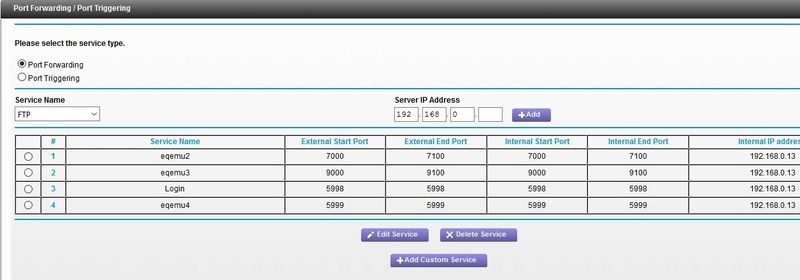
Changing server name then rebooting server.
Quote:
Then, manually create an entry in the table `tblWorldServerRegistration` in your database. Enter your long name/short name/3 (in `serverlisttypeid`)/192.168.0.13 (in last ip used)
That's all you need to do for that table.
|
I tried that, not very familiar with the syntax because all my manually created (long, detailed) query's fail. (I just copy/paste the long query's from the walkthroughs).
|
|
|
|
|
|
|
08-17-2015, 07:16 PM
|
|
Discordant
|
|
Join Date: Dec 2013
Posts: 297
|
|
I don't know what to say really. All I know is, I don't have a ton of knowledge on a lot of things related to this stuff. Because of this I try to follow tried and true methods to a T. Only upon almost certainty that I adhered to those methods, I try alternatives through my minimal knowledge base or logic with limited experience.
I don't know why you have 9000 to 9100 as a range in your ports. I don't know if a revised setup walkthrough asked for it or if it even matters.
Unless you are confident in your abilities, I would scrap any ideas about using an AX setup for an EQEmu system. Not intending to be critical with that statement just, to the point.
I would get your hands on a copy of HeidiSql pronto! It makes using MySQL quite a bit easier.
In the meantime you could use this:
use "yourDBname";
INSERT INTO `tblworldserverregistration` (`ServerLongName`, `ServerShortName`, `ServerListTypeID`, `ServerLastIPAddr`) VALUES ('yourname', 'yourname', 3, 'yourIP');
* Oh, and only change the text where it says yourname yourip, leave the little quotes. Remove the double quote for yourDBname so it's just use dbname;
|
|
|
|
| Thread Tools |
|
|
| Display Modes |
 Linear Mode Linear Mode
|
 Posting Rules
|
You may not post new threads
You may not post replies
You may not post attachments
You may not edit your posts
HTML code is Off
|
|
|
All times are GMT -4. The time now is 08:36 PM.
|
|
 |
|
 |
|
|
|
 |
|
 |
|
 |







